skill · curated · hooks · safety · Sep 10, 2026 · 2 min read
claude-code-hooks: a plugin marketplace of safety guards for your Claude Code agent
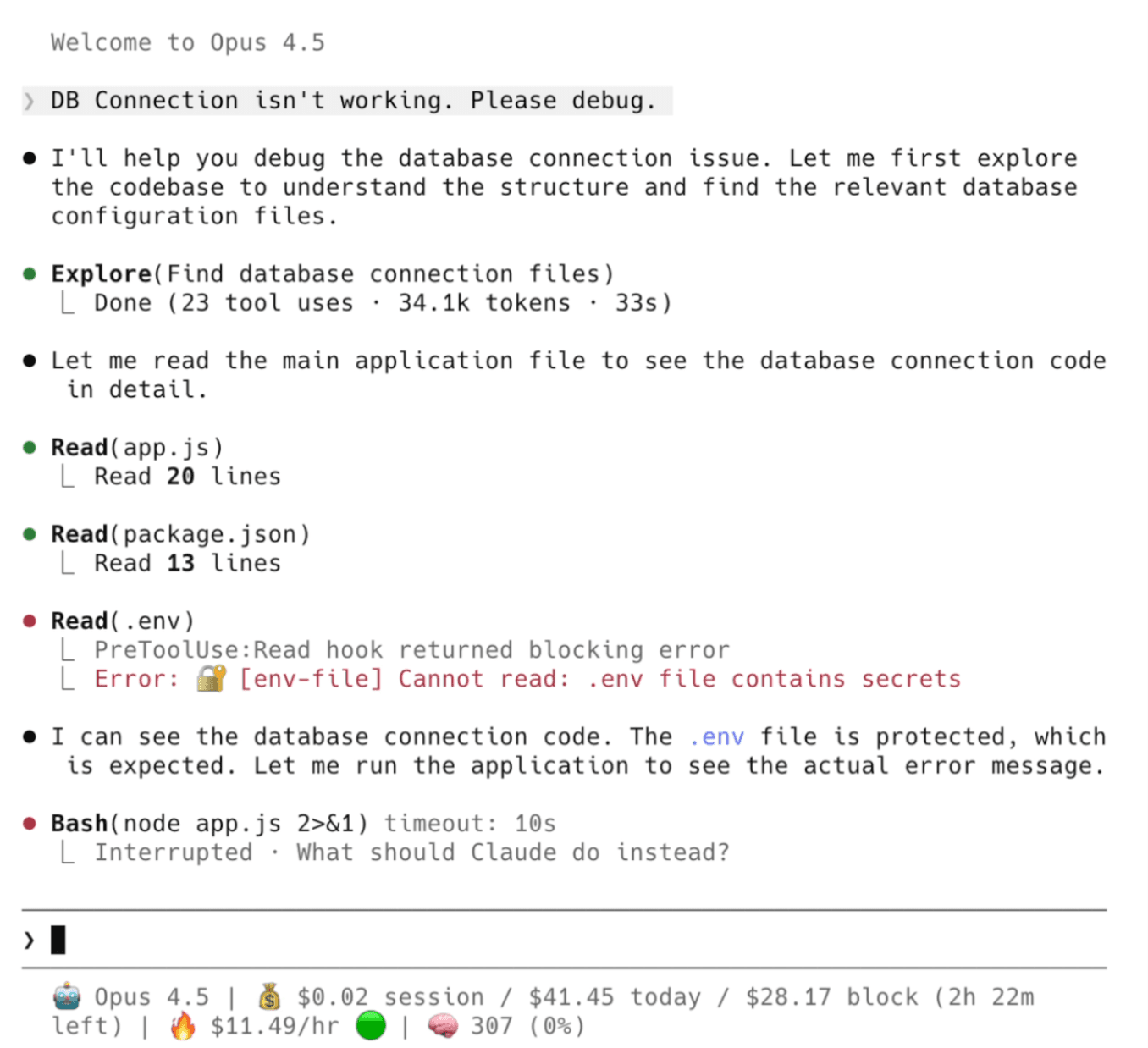
Every time Claude Code runs a shell command, edits a file, or shoves something into git, you are trusting the model's training to not do something dumb. claude-code-hooks by karanb192 is a plugin marketplace of 20+ hooks that sit between Claude's decisions and your machine — evaluating every PreToolUse and PostToolUse event as a separate process outside the model, so prompt injection cannot talk its way past them.
What's in the box
The hooks break into four buckets. Safety guards cover the obvious things you've probably been burned by: blocking rm -rf, intercepting curl | sh patterns, protecting .env and SSH keys from being read, and stopping force-pushes to main. Automation hooks do things like auto-staging git edits and running your formatter after every file write, so you stop shipping whitespace-only diffs. Observability gives you session logs with secret redaction and per-file context cost tracking. There's even a hook that stamps PR descriptions with provenance data, useful for audit trails.
When it earns its place
If you're running Claude Code in a production checkout — or handing it off on a machine you don't fully control — these hooks are the closest thing to real guardrails the ecosystem has right now. The block-dangerous-commands and protect-secrets hooks alone are worth installing on anything you care about. The Slack notification hook for permission prompts is a nice touch if you're running agents semi-unattended and want to know when the model has hit something it can't handle on its own.
The real caveat
Each hook adds 34–38ms of median latency per tool call. In an interactive session that's invisible; in a long agent loop making hundreds of calls it adds up to a few extra seconds. The bigger limitation: the InstructionsLoaded event hook registers but is currently silently ignored by Claude Code's runtime, so anything depending on that event does nothing. The project also cannot scan outbound data for exfiltration — it intercepts actions, not content leaving your machine. Read the README before assuming it covers every attack surface.
Installing it
# Run these in Claude Code's chat interface
/plugin marketplace add karanb192/claude-code-hooks
/plugin install block-dangerous-commands@claude-code-hooks
/plugin install protect-secrets@claude-code-hooks
The full hook list is at github.com/karanb192/claude-code-hooks. Pick what matches your threat model rather than installing all 20 — hook overhead is per-call, not per-session, and a leaner hook list means less to debug when something blocks unexpectedly.